Skip to content
Brand Building for Small Business

Brand Building for Small Business

A Blog for Entrepreneurs Looking to Create and Develop their Corporate Identity

  • Your Brand: The Beginning
    • Why Bother?
    • Build vs. Buy
    • Where to Begin?
    • What’s in a Name?
    • Design Your Own Logo
      • Don’t Let Them Mess with Your Logo
    • Know Your Audience
    • Vision Statement
    • Brand Style Guide
    • Choosing a Color
    • Business Cards
      • Microsoft Word
      • Corel Draw
    • Mission Statement
    • Business Letterhead
      • Microsoft Word – Instructions & Template
      • Microsoft Word – Video Tutorial
      • Corel Draw – Instructions & Template
    • Business Envelopes
    • Choosing Paper
    • Annual Brand Checkup
    • Side-by-Side Comparisons Can Be Helpful
    • Your Brand Manager
    • Role of Branding in Business Plans
  • Opportunities for Publicity
    • 10 Minute Branding
      • Ask a Customer (Just One) To Do a Review
      • Build a Contact Prospect List
      • Coffee Break!!
      • Conduct an Ongoing Three-a-Day Sales Campaign
      • Go Shopping!!
      • Press Release Generator – Sample Press Release on United Way Day of Caring [or Action] Involvement
      • Signage & Creating Branding
        • “Your Call Is Important To Us” (NOT!!)
        • Punny Signs
      • Sponsor a Community Team
    • Social Media
      • The Simplest Social Media Strategy
      • Get Your Business Started on Pinterest
      • How to Create a Facebook Page for Your Business
      • Social Media: One More Reason to Bother! (Betting on the Long Shot)
      • Creating a “Follow Us on Social Media” Sign
        • Microsoft Word
        • Corel Draw
      • Creating a Mail Merge Document for Direct Response Mailing
      • Branding Through Blogging
      • A “Legal-Approved” Free Collection of Social Media Icons
    • Social Influencers
      • How I Learned Social Influencers Rule the World
      • Approaching Social Influencers
      • Approaching Social Influencers: Sample Text
    • Reviews
      • Getting Reviews for Your Business
      • Review Request Sign
    • Direct Mail/Email
      • Role of Branding in Direct Mail/E-mail
    • Press Releases
      • Press Releases as Another Opportunity for Branding
      • Press Release Generator – Identifying Your Content
      • Press Release Generator – Sample Press Release Announcing a New Hire
      • Press Release Generator – Sample Press Release Announcing an Employee Promotion
      • Press Release to Introduce Ourselves as Part of National Small Business Week in May
    • Campaign (Re)Launches
      • The One That Got Away!
    • Small Bus Saturday
      • What Comes Between Black Friday and Cyber Monday?
    • Holidays
      • Holiday Cards
      • Free Holiday Card Template for Your Business
      • Holiday Branding
    • Charitable Contributions
    • October 27th:  National Blogger’s Day?
    • Bad Press
    • “Best of” Business Awards
    • National Small Business Week
  • Cultivating Your Presence
    • 10 Minute Branding
      • Brand Consistency
        • Always Have a Back-up on Hand
      • Monitoring Brand Mentions
        • When was the last time you googled yourself?
        • Make Google Alerts Work for Your Business
      • Protect Your Brand: Copyrights
        • Perform Regular Checks for Copyright Infringement
        • Stop Intellectual Property Thieves on Etsy
      • SEO
        • Make Sure Your Web Site is Included in Search Engines’ Index
        • Review Your Web Pages’ Titles
        • Review Your Web Pages’ Descriptions
        • Meta Keywords
      • Favicons (and a Favicon Generator)
      • A Match Made in Minutes
      • New Year Greetings
      • Order Pizza for Your Employees
      • Visit a Competitor’s Web Site
      • 2023 – Start a Fresh, New “To Do” List!!
      • Employee Reality Check
      • Ties That Bind (and Define)!!
      • Be Brand Proud; Sign Up Now!!
    • Design Resources
      • FREE Pictures Are Also Worth a 1,000 Words (and Can Help Promote Your Brand)!
      • Optimal Resolution for Optimal Output
      • How to Get the Best Fonts for Free
      • Finding the Right Font: A Review of the Best Available Font Viewers
      • A Few of My Favorite Fonts
      • Nicely Branded Displays Help Sell! (i.e., Branding and Your Trade-Show Booth)
    • Advertising
      • Role of Advertising in Successful Branding
      • Creating Ads that Communicate Your Brand
    • Web Design
      • Attention Small Business Owners: Yes, You Need a Web Site!
      • Web Design: Everyone has to Start Somewhere
      • A Simple SEO Hack from Neil Patel
      • SEO Resources
      • Landing Pages
    • Customer Service
      • Branding Through Customer Service
      • In Search of the Holy Grail (of Branding)
      • Clever Customer Service
    • Personal Branding
      • Personal Brand(ing) – Another Way to Build Your Small Business
      • Small Business vs. Entrepreneurship vs. “Influencer”: Which Best Describes You?
      • Personal Branding and the “Newspaper Test”
    • Crisis Management
      • Crises Management: Messages Sent Now Will Define You Forever
      • Weathering the Storm
      • Branding and the Pandemic
      • How to Market Your Small Business During Coronavirus Pandemic
      • Customer Service During Crises
      • Time to Rebrand?
      • Rebranding and the Cancel Culture
      • ZOOM!!
      • Considerations When Starting or Restarting a Brand
      • How to Protect Your Brand When You Receive Bad Publicity from Customers
    • Branding Calendar
    • Thank You Card
    • Happy Birthday Card
    • Political Branding
    • Copyright Protection
    • Motivation
      • Confidence
      • Dream Big
      • Getting Started
      • Moving Forward
      • Opportunity
      • Success
    • Today’s TIP
      • Another Way to Build Your Brand
      • Branding and the Role of Leadership
      • Bridge Building and National Small Business Week 2022
      • Celebrate
      • Embrace Responsive Branding
      • Fonts Matter
      • Give Thanks
      • A Good Brand
      • Invest in Your Brand
      • Keys to Branding
      • Listen to Your Customers
      • Montor Your Web Site Branding Over Time
      • Networking
      • Pride Month
      • Reputation is Everything
      • Request Testimonials
      • Role of Introspection
      • The Roles of Perspiration vs. Inspiration
      • Saying Thank You
      • Shaping Your Brand
      • Take a Break
      • The U.S.A. as a Brand
      • Volunteering
      • A Way to Welcome a Brand New Year
      • You Can Multiply Each Customer Contact X 11
      • Your Brand Story
      • Brand Recognition
  • About Us
    • Bob Thomas
    • Carole Mancuso
    • Current Approach to Branding
      • How to Build Your Brand 10 Minutes at a Time
      • Weeeeeeeeeeee’re Back . . .!
  • Other Resources

Design Your Own Logo

Carole Mancuso The Beginning September 8, 2019November 23, 2020 6 Minutes

Disclaimer:  While we only recommend products we know and love, we want to note we use affiliate links and may earn a commission for purchases made through those links.

Lots of businessowners question whether they’re creative or tech-savvy enough to create their own logo.  Unfortunately, I can’t tell you neither of those qualities are needed, but I can safely say they’re not needed in the abundance you probably imagine.

Things you do need to design your own logo:

  • A little creativity
  • A little tech savvy
  • A vector editing program (available for free)
  • Lots of fonts choices (available for free)
  • Lots of icon choices – IF you want a graphical component to your logo (available for very minimal cost; the icon used in our logo cost $2.99)

So where to start?

While graphic design isn’t my specific trade, I’ve been asked to create dozens of logos throughout my career.  Every time, I start by facing that same dreaded obstacle: the blank page.  I stare at it, thinking about what the logo should represent and the type of fonts, colors, and imagery to best suit that message. Meanwhile, a blank page relentlessly stares back.

While a tedious process, you should set your expectations for your logo before you pick up a pencil (or the mouse). 

Originally, logos were introduced as an aid to people who couldn’t read.  As a result, the earliest designs tended to be very literal. (For example, a shoemaker’s logo would inevitably show a shoe.)  Over time, the purpose of logos has evolved to become a broader reflection of brand but remains a key way of differentiating yourself in the marketplace. 

So what’s the personality of your company?  Is your business youthful and trendsetting?  Conservative and financially strong?  Fun and whimsical?  Product-focused and straightforward?  Some combination thereof?  This corporate identity (or brand) needs to be communicated in your logo – through your font(s), color(s), placement of words, and any graphics. 

If once you have a strong sense of your business “personality” in mind, your page is still unyielding in its never-ending canvas of white, go looking for some inspiration. . . .

For the Brand Building for Small Business logo, I knew I wanted to try something graphical to literally represent the act of “building.”  I was initially picturing letters being nailed but knew that would be tricky to execute in a clear way.  So, I went to my go-to spot for inspiration:  google images.  I searched for “building logo,” hoping the results would be full of construction-type logos also looking to convey the literal act of “building.”  But no, Carole, searching “building logos” yields lots of logos of buildings.

. . . Should have foreseen that.  Instead, I searched for “building construction logos” and found more of what I had in mind.

A couple screens in, I found inspiration.
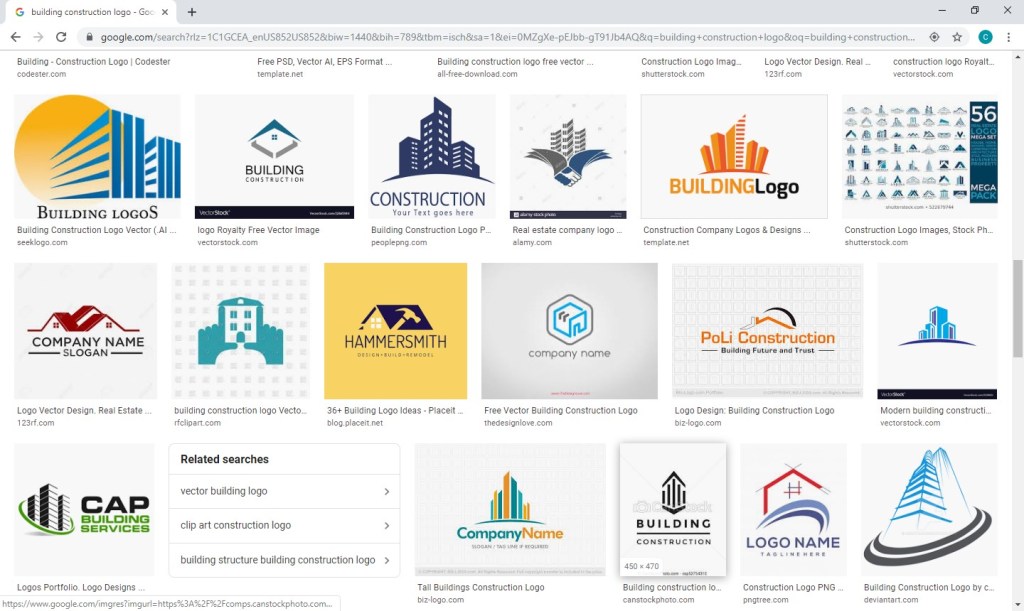
Looking at the Hammersmith logo (in navy and white on a yellow background), I love the way the hammer is a silhouette within the house and appears to be captured mid-swing.  I immediately knew I wanted to try a hammer silhouette, but I wanted the graphic to appear within the company name and not as part of a separate graphical element. 

A quick note on inspiration versus copyright infringement:  This is an area requiring caution.  Whereas you can use a silhouette of a hammer as seen in one logo in another, creating a logo for a construction company with a silhouette of a hammer in a navy house with white windows on a yellow background would most certainly earn you front-row seats to the case of them v. you.  An individual idea cannot be copyrighted; however, “a collection of ideas” makes a logo (or any other original work) unique and can be protected by law.  Tread carefully.

LOGO ICONS

So, where does one go for icons that could legally be used as part of a logo for minimal cost?  A number of options exist, but I like https://thenounproject.com/.  They have a large selection and charge nominal, one-time fees per icon.  I found the hammer for our logo for $2.99.

A number of choices were available. . . .

I selected a classic and simple hammer.

I then purchased and downloaded the file in PNG (bitmap image with a transparent background) and SVG (vector) formats.   (A separate article on Vector vs Bitmap file formats is planned.)

VECTOR/GRAPHICS SOFTWARE

Now what to do with your icon?  We use the vector and graphics editor, CorelDraw.  While the suite is powerful and much cheaper than your standard graphics package, the cost is still pretty steep in the $500 ballpark.  I read a few articles on free vector-editing programs, found Inkscape (https://inkscape.org/) to be highly recommended, and gave it a go.  The program seems to have the features needed to get the job done.  (And, they make a number of tutorials available, including one on the basic tools:  https://inkscape.org/en/doc/tutorials/basic/tutorial-basic.html.)

FONTS

An obvious first step when selecting a font to use for your logo is to scroll through the existing fonts on your computer to see whether anything catches your eye.  Remember that you’re not looking for the font that necessarily looks the best to you; rather, you’re looking for the one that best represents your business’s brand.  If you’ve picked out an icon at this point, you’ll also need to be mindful of the way a given font looks with your chosen icon.  You can have an icon and a font that both separately represent your brand perfectly but just don’t look good together.  Since I wanted to try including the hammer as a silhouette within the words for Brand Building for Small Business, I needed a really bold, thick font.  I gave Arial Black a try, knowing it’s the boldest font currently available on my computer, but I wasn’t really pleased with the result.

Thankfully, a source exists offering hundreds of (*free*) fonts in a searchable format that actually makes the process relatively easy.  With Google Fonts (https://fonts.google.com), I was able to type in my sample text, BRAND BUILDING, the size I wanted to preview, 60 px, and my desired font characteristic(s), increased thickness.
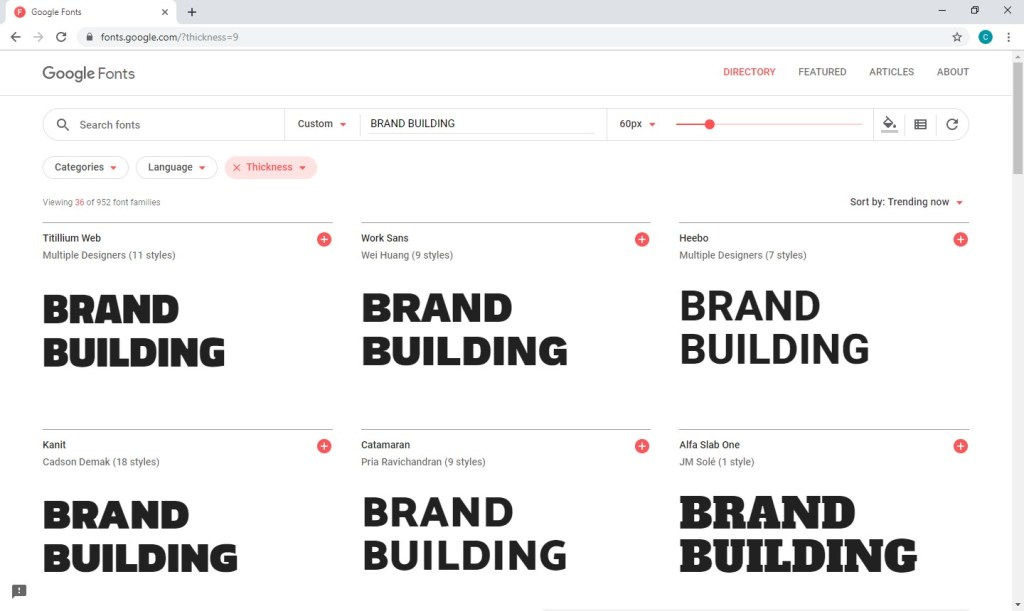
After much trial and error (downloading, installing, and trying dozens of fonts), I found Titillium Web Black and a contrasting script, Candelion Regular, to work in black and two shades of navy.

While I am VERY tempted to digress at this point and start talking about some of the many techniques that can be used to marry the fonts/words used in your logo to the images you’ve chosen . . . I keep reminding myself that level of detail is really better suited for another blog entry further down the road.  For now, I will stick to my original plan to keep this message broad but nevertheless offer a few . . .

CONSIDERATIONS

At some point, you may choose to print sales materials in grayscale or advertise in a print media in black and white.  You may want to have branded pens for your company (requiring a very, very small logo) or you may purchase a building on Times Square and want your logo proudly illuminated on top (requiring a very, very large logo).  Before you decide your design is a done deal, you should run a few tests.  Try changing your color scheme to grayscale as well as black and white and print a very small version (one half  inch on its biggest side should be sufficient) and a very large version (full page).  If all variations look ok, you’ve probably got a keeper.

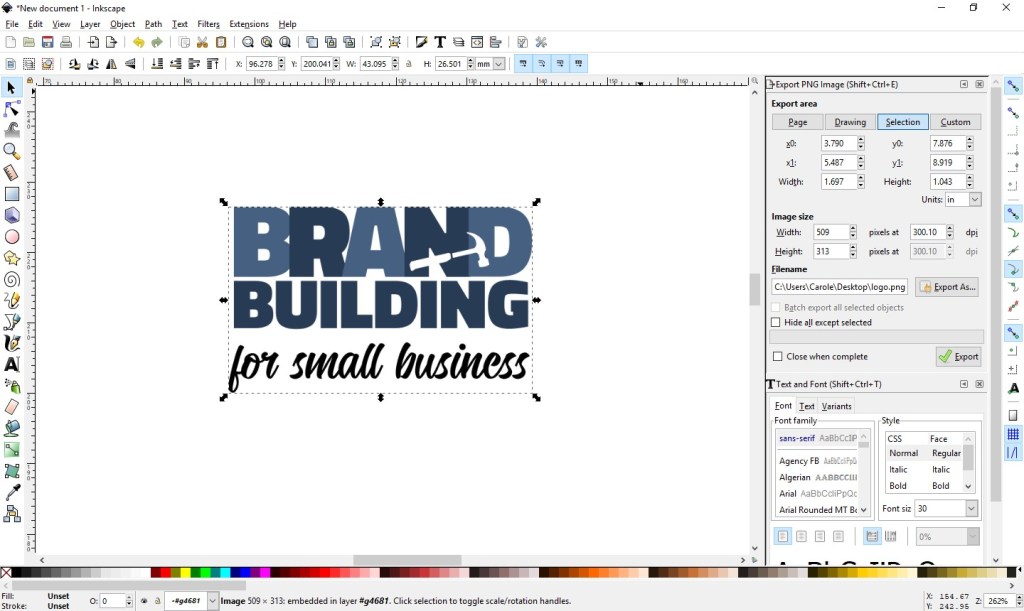
Export your new logo as a high-resolution transparent RGB PNG, which will work well in MOST (but not all) environments.  (Inkscape export settings are shown at right below.)
Once you’ve managed to get this far, you’ll want to protect your work.  Your logo should be registered as a trademark.  If you are not of a mind to involve your lawyer in the process, consider checking out various on-line alternatives and look into the steps involved in going the DIY route (for example: https://www.wikihow.com/Register-a-Trademark-Without-an-Attorney).

Next up . . . confirm your understanding of your business’s audience; read: Know Your Audience.

Share this:

  • Click to share on X (Opens in new window) X
  • Click to share on Facebook (Opens in new window) Facebook
Like Loading...

Related

  • Tagged
  • beginners
  • brand
  • business
  • create
  • design
  • diy
  • how to
  • logo
  • make
  • small
  • tips
Unknown's avatar

Published by Carole Mancuso

Carole is a lead content developer for Brand Building for Small Business, a new venture, though she has been performing the art of brand building in some form since 2001. She owns and runs Instant Invitation, which also operates as Inked Invitation through Zazzle. She designs graphics, develops personal and small business templates, and works to steadily build the company’s brand. Instant Invitation was established in 2014 and currently produces six-figure annual earnings with consistent year-over-year growth. Carole spent 15 years in the corporate sector in the Communications department of now Berkshire Hathaway GUARD Insurance Companies (a national billion-dollar company). As Communications Manager, she was responsible for the company’s web site, online advertising, social media, and promotional email. When the desire to be close to family and closer to the sun brought her to Arizona (across the country from the company’s corporate operations), she began pursuing her own business. She taught Public Relations and Organizational Communications courses at Wilkes University and Introductory Communications at Northampton Community College. She is happiest while spending time with her husband and two children as well as their extended family and close friends. She loves the beach and all things wine. View all posts by Carole Mancuso

Published September 8, 2019November 23, 2020

Post navigation

Previous Post What’s in a Name?
Next Post The Role of a Brand Style Guide

6 thoughts on “Design Your Own Logo”

  1. Pingback: What’s in a Name?
  2. Pingback: FREE Pictures Are Also Worth a 1,000 Words (and Can Help Promote Your Brand)!
  3. Pingback: Considerations When Starting or Restarting a Brand – Brand Building for Small Business
  4. Pingback: Building Blocks: The Beginning – Brand Building for Small Business
  5. Pingback: How to Easily Create Letterhead for Your Business in Corel Draw (Template Included) – Brand Building for Small Business
  6. Pingback: New Products Alert: CorelDraw as Standalone Software – Brand Building for Small Business

Leave a comment Cancel reply

Enter your email address to follow this blog and receive notifications of new posts by email.

Join 584 other subscribers

Enter your email address to follow this blog and receive notifications of new posts by email.

Join 584 other subscribers
Create a website or blog at WordPress.com
Privacy & Cookies: This site uses cookies. By continuing to use this website, you agree to their use.
To find out more, including how to control cookies, see here: Cookie Policy
  • Comment
  • Reblog
  • Subscribe Subscribed
    • Brand Building for Small Business
    • Join 529 other subscribers
    • Already have a WordPress.com account? Log in now.
    • Brand Building for Small Business
    • Subscribe Subscribed
    • Sign up
    • Log in
    • Copy shortlink
    • Report this content
    • View post in Reader
    • Manage subscriptions
    • Collapse this bar
 

Loading Comments...
 

    %d